
template
BitFocus Companion Template — ATEM Control Page
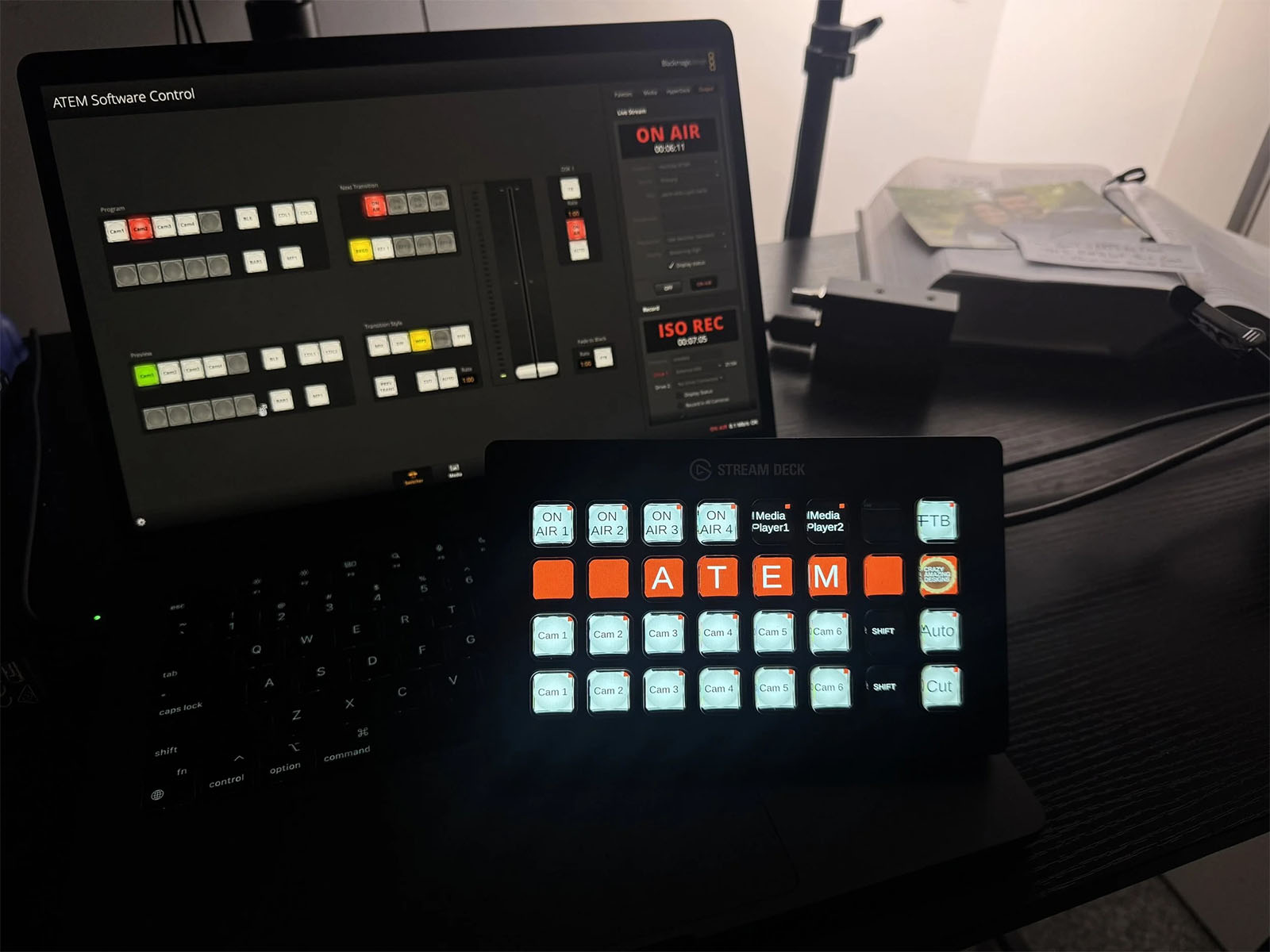
Ready-made Companion pages that turn a Stream Deck into an ATEM switcher panel. Includes the original pages from the video plus the 2026 update, with versions for Companion 4 and Companion 5.
- The original pages from the video, plus the 2026 update
- Versions for Companion 4 and Companion 5
- Layouts for the Stream Deck XL (12 cameras) and the 15-key Stream Deck (8 cameras)
- Program, preview, CUT, AUTO, fade to black, keys, media players, stream and record
If you’ve ever clicked through nested ATEM menus mid-service, you know the pain. This template turns a Stream Deck into a switcher panel your volunteers can read at a glance: program and preview rows, CUT and AUTO, fade to black, keys and media players.
What’s inside
- The original pages, exactly as built in the video: the main page plus a SHIFT page for cameras 7–12, made for the Stream Deck XL.
- The 2026 update, the same idea rebuilt:
- Versions for Companion 5 and Companion 4
- Layouts for the Stream Deck XL (cameras 1–12) and the 15-key Stream Deck (cameras 1–8)
- Downstream keys for lower thirds, Mix / Dip / Wipe, and Stream / Record keys that start on a 2-second hold, so they never fire by accident
- Keys stay dark when off and light up red, green or amber when live
- In Companion 5: your ATEM’s own input names on the keys, PGM / PVW tags, a flashing fade to black and a transition progress bar
- The key images as PNG files, for building your own pages
How to install
- In Companion, open Import / Export, click Import configuration and choose the Page 1 file for your Companion version and Stream Deck
- Link it to your ATEM connection (or create one), choose Insert new page and import
- Repeat with the Page 2 file, so it lands right after Page 1
- Send your Stream Deck to the new page
A README in the download walks through every step.
Already own it? Sign in to your account and download it again. The update is included.
Who this is for
Churches and event producers running an ATEM switcher who want to skip the hours of button-mapping. Also a great teaching tool for training volunteers — the button layout makes what the switcher is doing visually obvious.
More like this
Other templates you might like.
template
Conference Room Control System Template
Build a Bitfocus Companion + StreamDeck control system for any conference room, classroom, or multi-purpose space. Core software files + docs for controlling X32, ATEM switcher, and more from a single surface.
template
Logo Sticker Pack for ProPresenter
10 animated versions of your church logo for ProPresenter 22: float, light sweep, halo rings, sparkles, pop, wipe and more. Free preview; buy only if you love it.
template
ProPresenter Quick Start Template
A Sunday-ready ProPresenter setup: playlists, songs, sermon layouts, announcements, macros, looks, stage displays, themes and props that already work together. Works in ProPresenter 22.
Questions about this product?
Ask right here and get an answer now, or send a note and Nathan will personally reply.