
 try the app — one swipe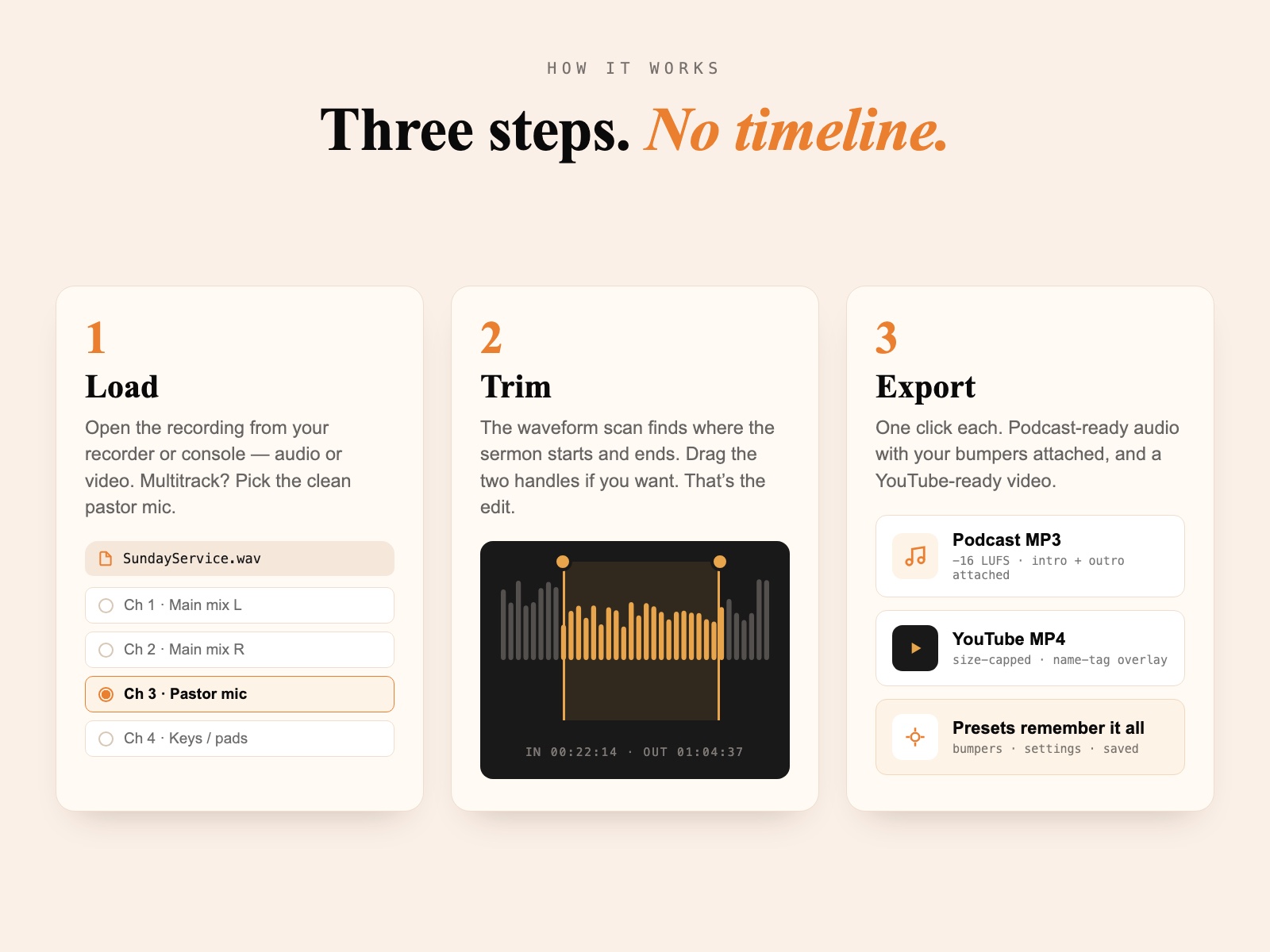
6 slides · next up: the interactive app
tool
NewMedia Processor Sermon to Podcast/YouTubein Minutes
Use Media Processor to quickly edit the sermon from your service video. Audio levels are balanced automatically to broadcast standards. Add your intro and outro, and export the finished files — in minutes.
One-time purchase · 12 months of updates included · Instant download · macOS 13+
On Windows?
Media Processor for Windows — join the waitlist
Media Processor runs on macOS today — and the Windows version is already built and in testing. This list decides when it ships: when 10 people raise a hand, Windows goes out the door, and everyone on the list gets it that day.
You'll get a confirmation email plus occasional church-tech tips from Crazy Amazing Designs. Unsubscribe any time.
Counting hands…
ships at 10 · work in progress
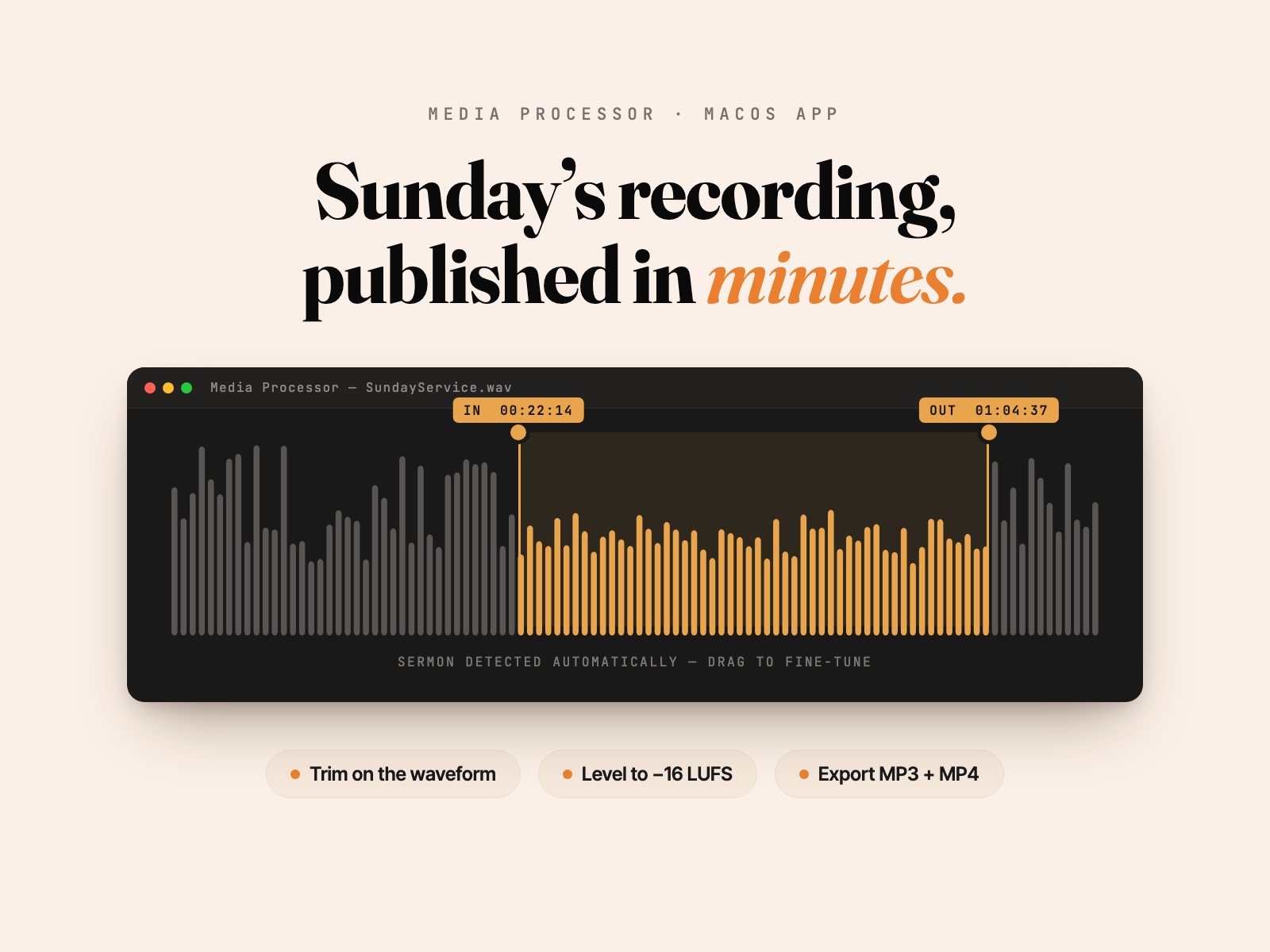
The Mac app that turns Sunday's raw recording into a finished podcast episode and a YouTube-ready video. Load the file, drag two handles, export. No timeline, no learning curve.
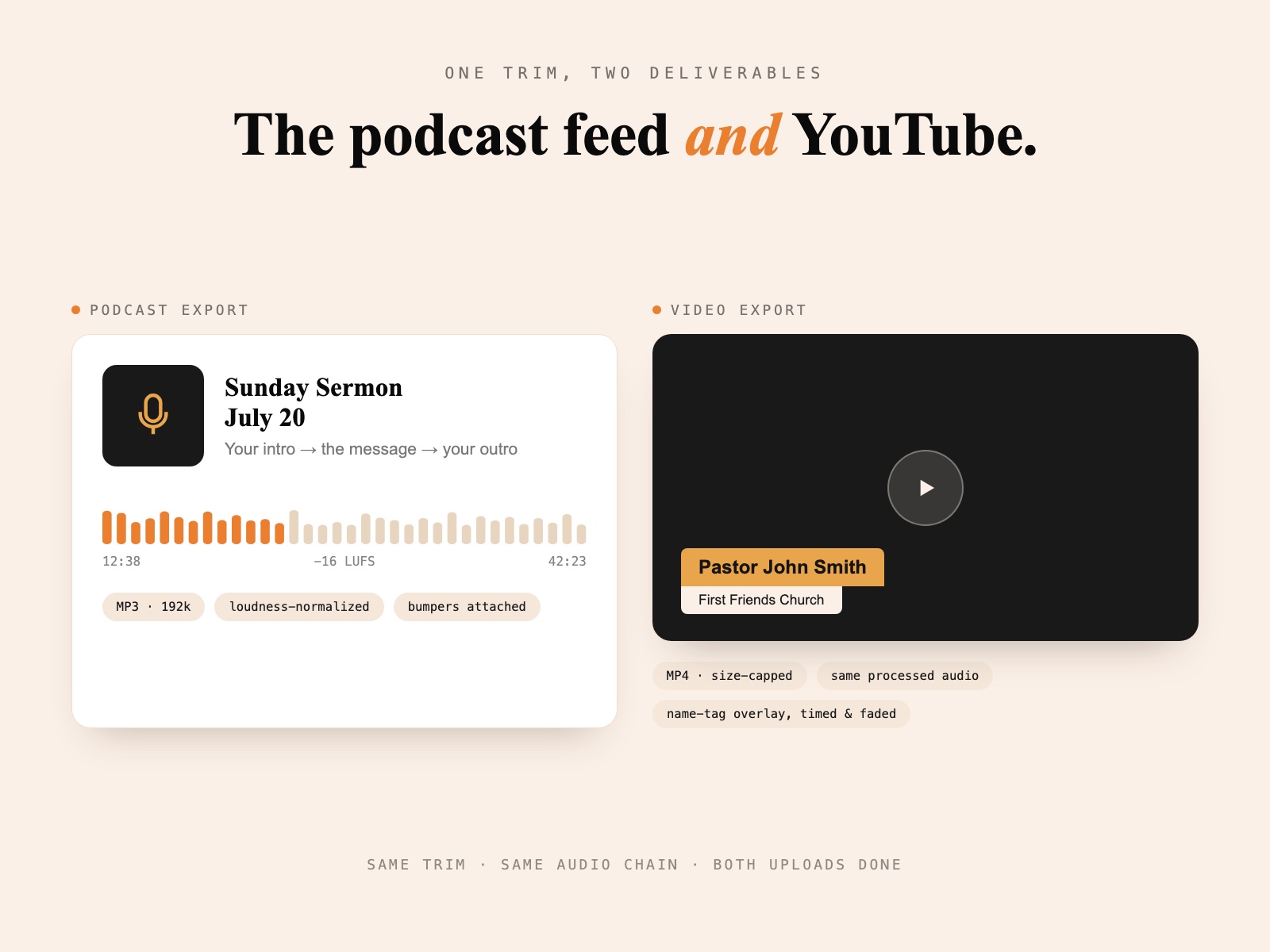
- One trim, two exports: a YouTube-ready video AND a podcast-ready MP3/WAV — or click Export Both and get them in one pass
- See the video while you trim — the preview follows the playhead, so you know exactly where the sermon starts
- Boosts and balances the sermon audio to broadcast standards, automatically
- Multitrack-aware: pull from the stereo pair or a single clean channel, like the pastor's mic
- Add the pastor's name tag right in the program — preview the exact frame before you export
- Set a max video file size, or just roll with the recommended export
- Intro + outro presets per service — Sunday morning, midweek, young adults — with your bumpers kept safe in the app's own library
- Built by Crazy Amazing Designs — the same app that runs our own church's weekly workflow
Every week it’s the same job: find where the sermon starts in a 90-minute service recording, trim it, fix the uneven audio, bolt on your intro and outro, export for the podcast feed — and then do most of it again for YouTube.
You can do all of that in a video editor. We own Premiere and we still don’t — because Media Processor does the whole thing in minutes, and there’s nothing to learn.
We built Media Processor here at Crazy Amazing Designs for exactly this: take your service video, trim out the sermon, and export it for YouTube with the audio boosted — and from the same trim, export the audio as an MP3 or WAV for your podcast platform. One program, both formats, no timeline.
How it works
Load your recording
Audio or video, straight from your recorder or console. If it's a multitrack file, pick your source — the stereo pair, or a single clean channel like the pastor mic instead of the room mix.
Trim on the waveform
The app scans the file and marks where the sermon starts and ends — music, speech, and silence are detected automatically. Drag the IN and OUT handles while the video preview follows along, so you can see exactly where the pastor starts. That's the whole edit.
Export — video, audio, or both
For YouTube: a ready-to-upload video with the audio boosted, the pastor's name tag overlaid right where you want it, and a file-size cap you control — set your own limit or roll with the recommended one. For your podcast platform: an MP3 or WAV of the same trim, with your intro and outro attached. Or click Export Both — one pass, both files, with live progress while it renders.
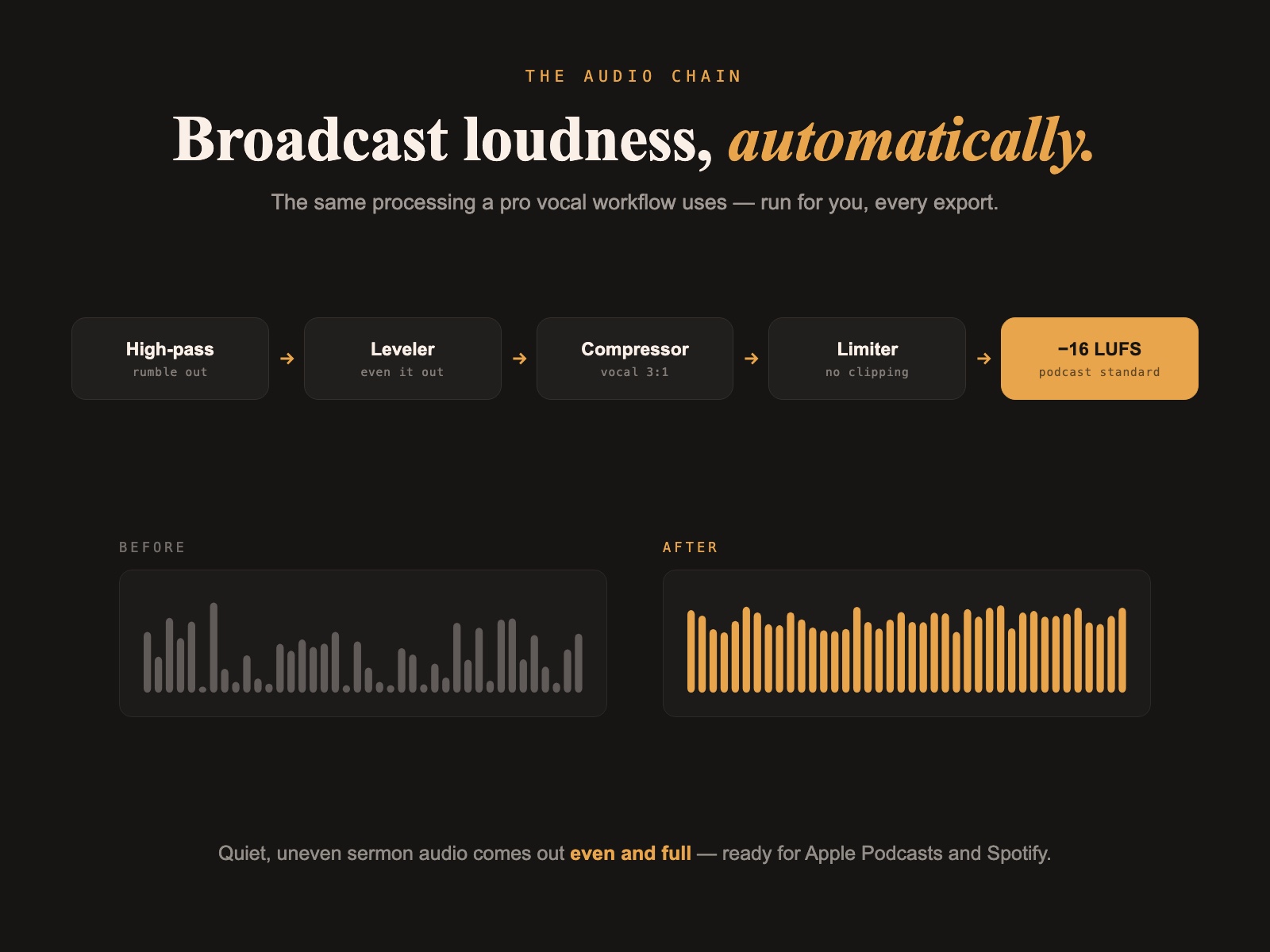
The audio chain — every export
High-pass Leveler Compressor Limiter −16 LUFS · podcast standard
Quiet, uneven sermon audio comes out even and full — ready for Apple Podcasts and Spotify. Your intro and outro are attached exactly as you made them: only the sermon runs through the chain, so your polished bumpers stay untouched.
Built for the weekly grind
Media Processor came out of our own Sunday workflow — it processes a real church’s podcast and YouTube feed every single week.
Presets make the repeat weeks effortless: set up Sunday Morning with your main intro and outro, a Midweek preset with different bumpers, a Young Adults preset with its own — and run them all from the same laptop. Pick the preset, trim, export. Done.
And the app protects the repeat weeks, too: every bumper and name tag you pick is copied into Media Processor’s own asset library, so a preset never breaks because a file got moved or cleaned off the Desktop. If something ever does go missing, you’re warned before export — not halfway through it.
$79 once
One-time purchase. The app is yours forever.
Includes 12 months of app updates. No subscription, no account, no per-export fees.
Before you buy
Questions, answered.
- Is this a subscription?
- No. Media Processor is a one-time $79 purchase, and the app is yours to keep. Your purchase includes 12 months of app updates — after that, the version you have keeps working forever.
- Does it replace my video editor?
- No — and it's not trying to. Premiere and DaVinci are great for creative edits. Media Processor exists because the weekly sermon export is the same job every single week, and doing it in a full editor is slow. We built this app for our own church workflow and still use it every Sunday, right alongside Premiere.
- What files does it accept?
- Audio (WAV, MP3) and video recordings. It's multi-channel aware, so if your recording came from a console like a Behringer X32 or WING with multiple channels, you can pull from a stereo pair or a single clean channel — like the pastor mic — instead of the main mix.
- What does the audio processing actually do?
- The chain matches a professional vocal workflow: high-pass filter, leveling, vocal compression, peak limiting, and loudness normalization to −16 LUFS — the standard Apple Podcasts and Spotify target. Quiet, inconsistent sermon audio comes out even and full. Your intro and outro bumpers are attached untouched — only the sermon audio runs through the chain, so the bumpers you already polished stay exactly as you made them.
- What happens if I move or delete my intro/outro files?
- Nothing breaks. When you pick a bumper or name tag, Media Processor copies it into its own library (Documents → Media Processor), and your presets load from there. If a file ever does go missing, the app warns you right under the field — instead of failing halfway through an export.
- How do I download it — and how do updates work?
- The moment you purchase, we email you your download link. You can also re-download any time: create a free account here with your purchase email, and Media Processor appears under your purchases. When an update ships, the app shows a banner on launch and sends you right back here to grab the latest version — included with your purchase for 12 months.
- What do I need to run it?
- A Mac running macOS 13 or later. That's it — everything the app needs is built in, including the audio engine. No installs, no plugins, no account.
Ready to get started?
$79
One-time purchase · 12 months of updates included · Instant download · macOS 13+
More like this
Other tools you might like.
tool
StageFeed — Live Production Data on Your ProPresenter Stage Display
The Mac app that puts mic battery levels, channel names, timers — anything Bitfocus Companion can see — right on your ProPresenter stage display. Each value becomes a box you place like any other.
tool
ShowBuilder — Automatic X32 / M32 Show Files
Build a complete, custom Behringer X32 / Midas M32 show file in minutes. Answer a few questions about your stage and team, and ShowBuilder generates the routing, scenes, faders, and channel labels for you.
Questions about this product?
Ask Handi on the homepage, or send a note and Nathan will personally reply.