
5 images · swipe or use arrows
tool
NewStageFeed Live Production Data,On Your Stage Display
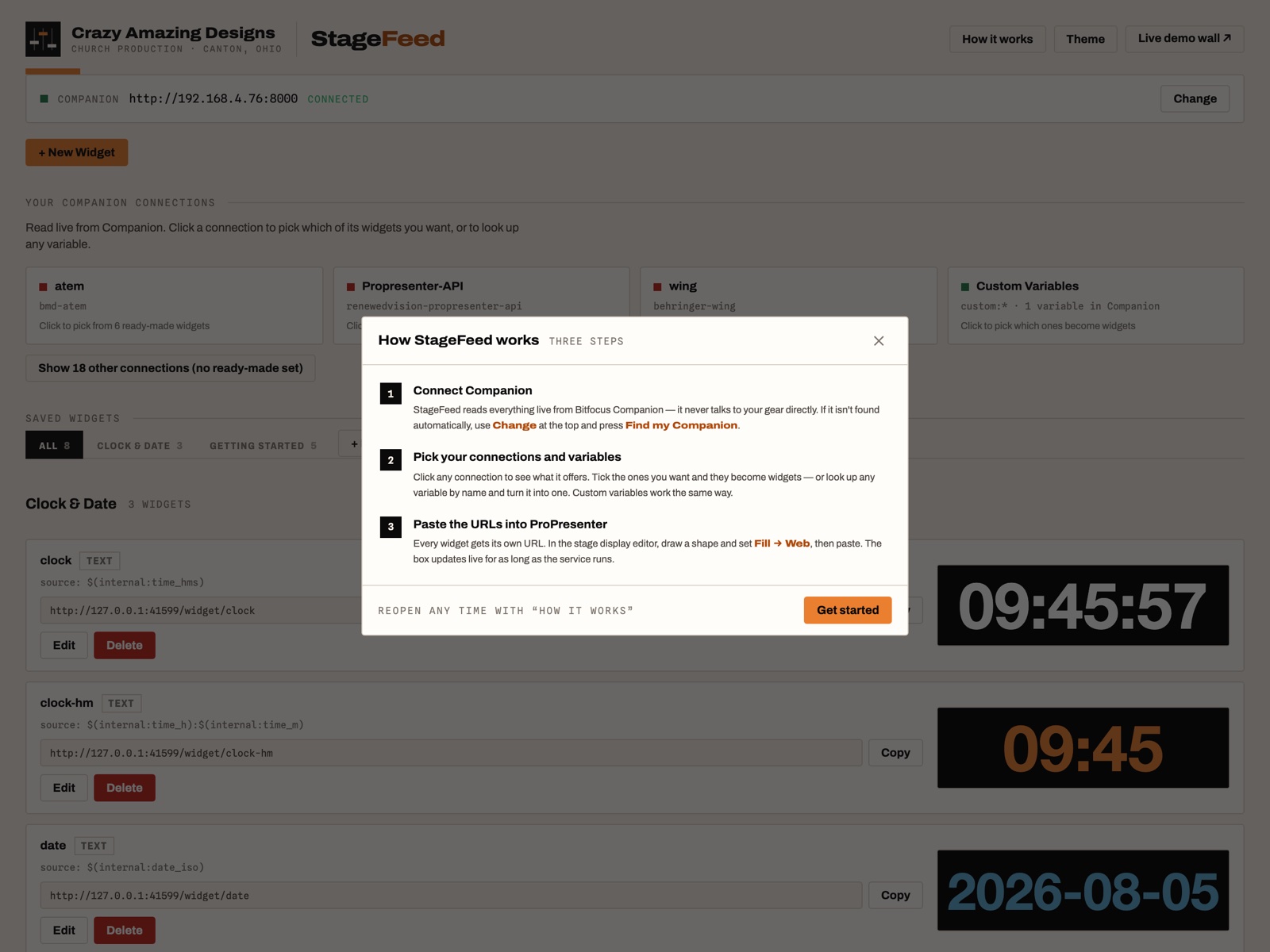
StageFeed reads live variables from Bitfocus Companion and serves each one as its own web URL. Drop them into ProPresenter's stage display with Fill → Web, and the person on stage finally sees what the gear knows.
One-time purchase · 12 months of updates included · Instant download · macOS 13+
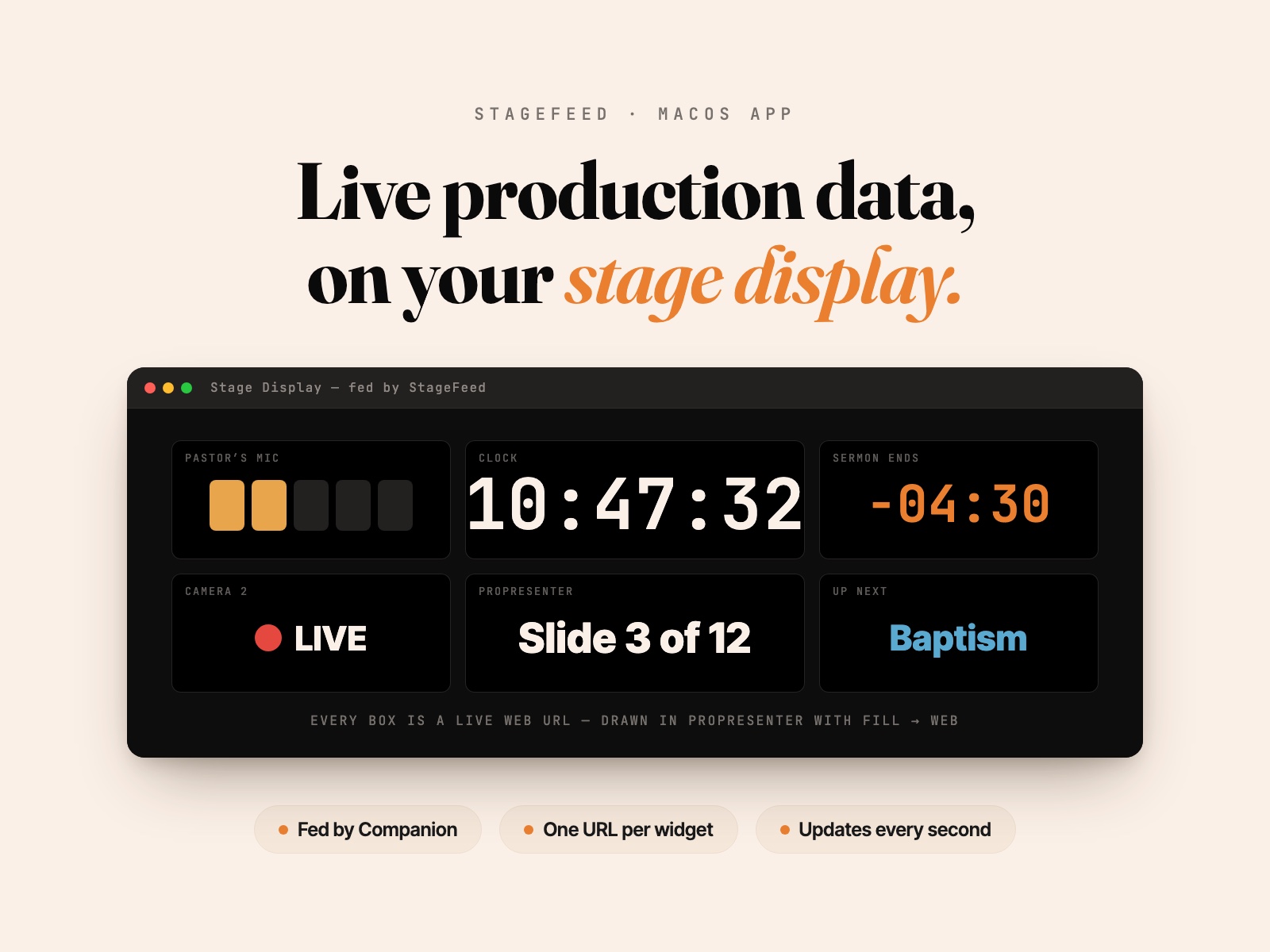
The Mac app that puts mic battery levels, channel names, timers — anything Bitfocus Companion can see — right on your ProPresenter stage display. Each value becomes a box you place like any other.
- Works with anything Companion supports — around 600 modules — so one app covers your mics, console, switcher, and planning software
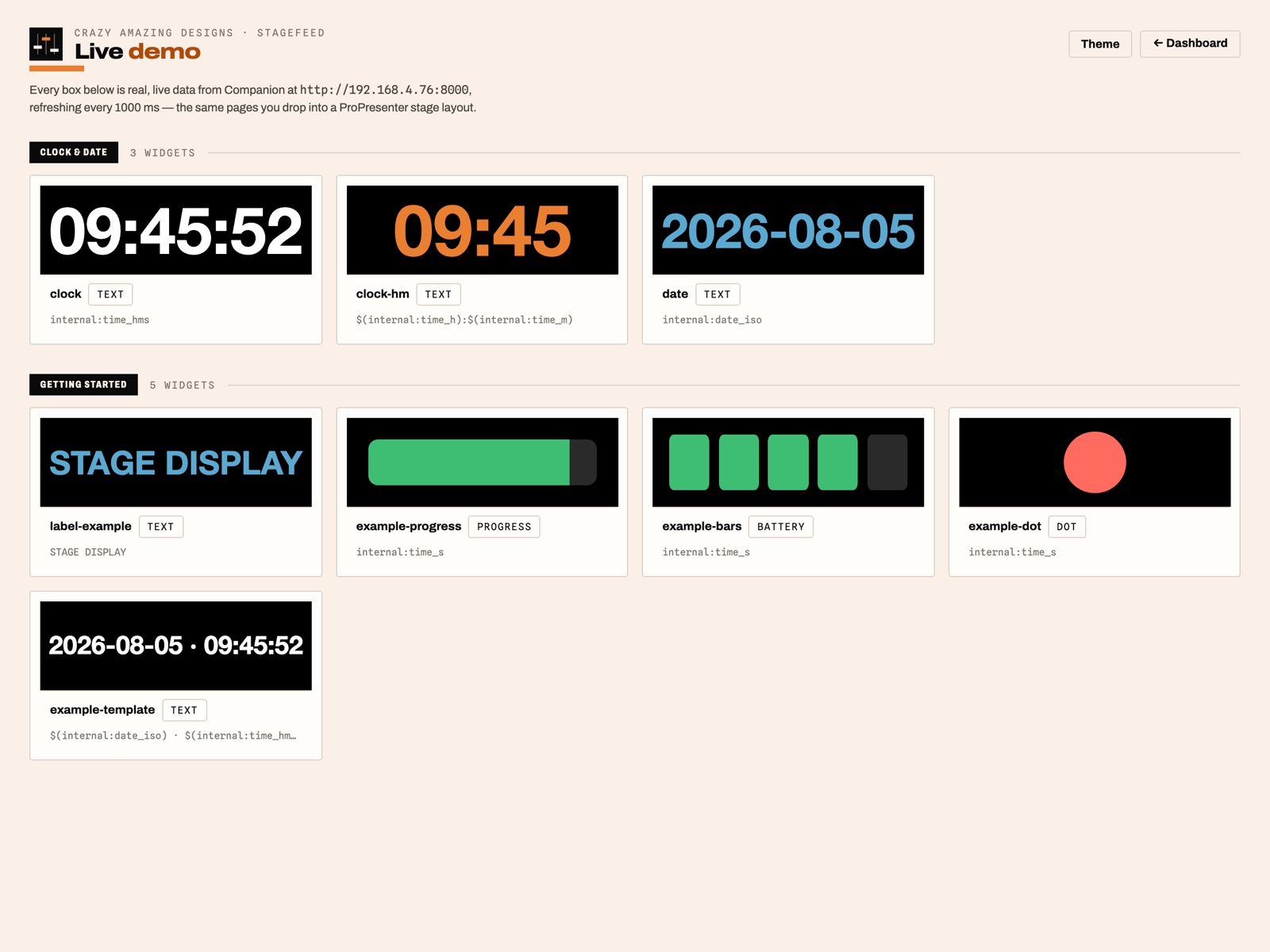
- Four widget types: auto-fitting text, battery bars with warning colors, progress bars, and status dots
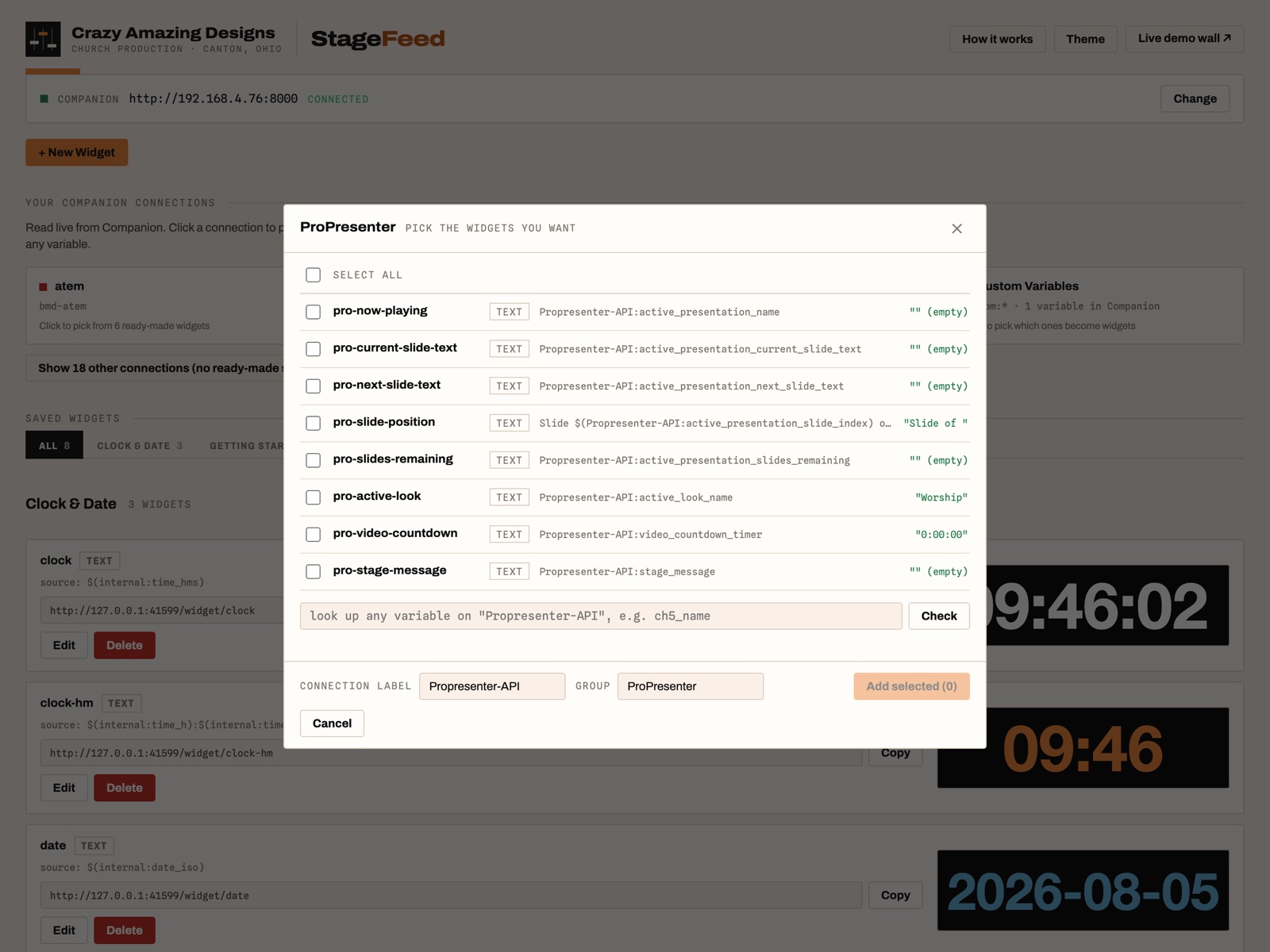
- Ready-made widget sets for ProPresenter, OBS, ATEM, Behringer WING, Planning Center Live, Shure Wireless, and more — click a connection and tick what you want
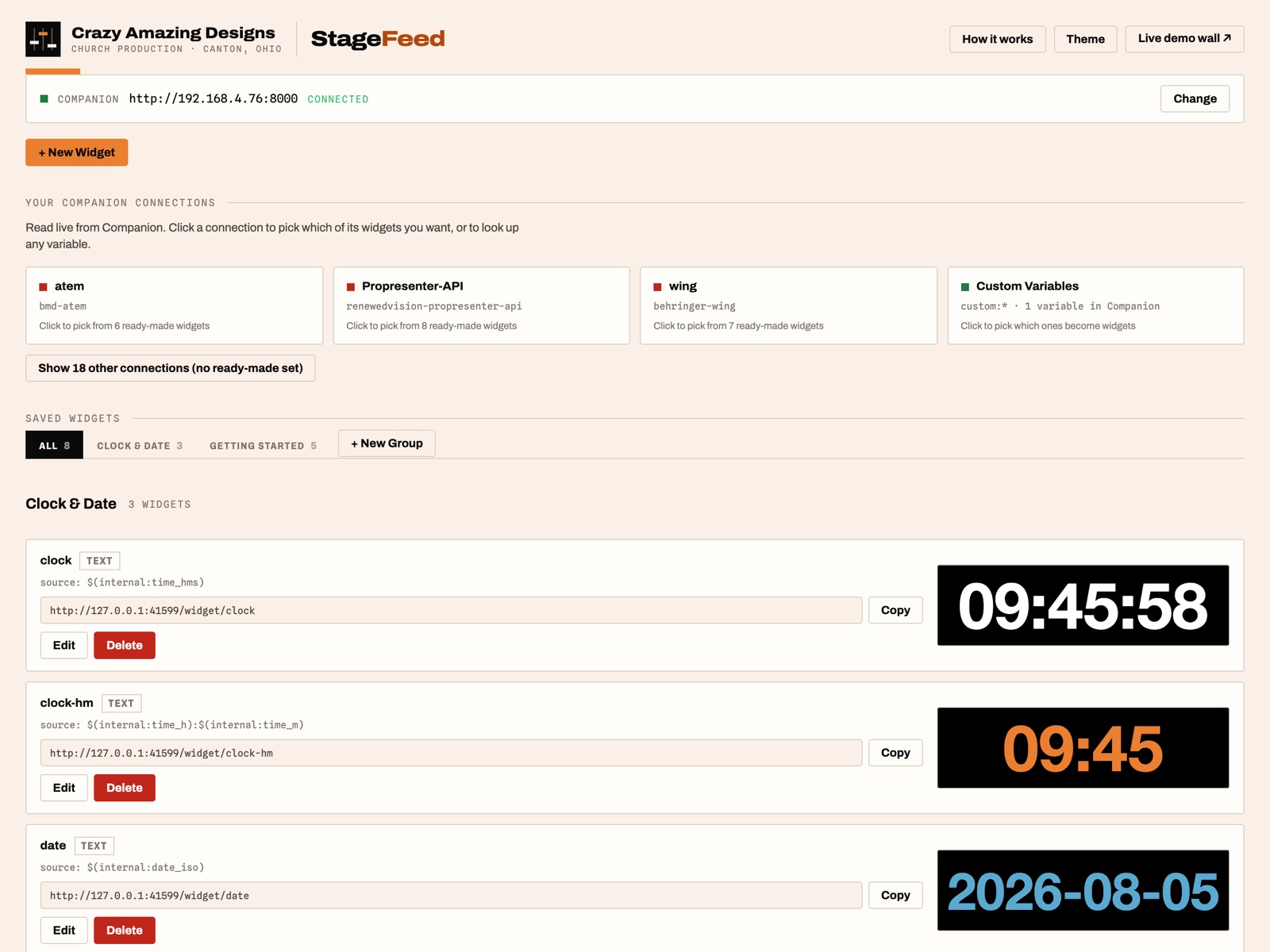
- Live dashboard with a preview that updates as you style each widget
- Templates mix text and multiple variables in one box — like 'Slide 3 of 12'
- Widgets dim when data stops arriving, so a dead link never looks like good data
- Opens at login — the stage display is fed before anyone asks
- No dependencies: the runtime is bundled, signed with a Developer ID, and notarized by Apple
ProPresenter’s stage display can show slides, notes, and a clock. It can’t show that the pastor’s mic is on one bar, that camera 2 is live, or that the countdown in another system says ninety seconds.
That information lives in the gear — and the people who need it most, the person on stage and the director, are looking at a screen that can’t reach it. StageFeed fixes that.
How the data flows
Your gear Companion StageFeed one URL per widget ProPresenter · Fill → Web
Because it goes through Bitfocus Companion, StageFeed works with anything Companion supports — around 600 modules — without needing to know a thing about your specific gear.
Three steps
Connect Companion
StageFeed finds Companion automatically on your machine. If you run a Stream Deck, you're probably already set up.
Pick your variables
Click a connection and tick what you want — live values show right next to each checkbox. Ready-made sets cover the common gear, and you can look up any variable by name.
Paste the URLs into ProPresenter
Stage editor → draw a shape → Fill → Web → paste. Each value is its own box, so you place and size it like anything else on the layout. The box updates live for as long as the service runs.
What you get
Four widget types cover the data a stage display actually needs: text that auto-fits its box (names, numbers, timers), battery bars with warning and critical colors, a progress fill over any numeric range, and a dot that changes color by value.
Ready-made widget sets ship for the gear you already own — ProPresenter (now playing, slide position, countdowns, stage message), OBS Studio, Blackmagic ATEM, Behringer WING, Planning Center Services Live, Shure Wireless, and a set of basics that works with no gear at all. Click a connection, tick the boxes, done.
Big rig? Group tabs keep it organized. Want more than one value in a box? Templates mix text and variables freely — Slide $(pro:slide_index) of $(pro:slides_count). And anything a Companion trigger can compute becomes a widget through custom variables.
One detail we care about: when data stops arriving, widgets dim. A dead link never looks like good data — nobody on stage trusts a frozen battery bar that still reads full.
Honest limits
StageFeed requires Bitfocus Companion — it’s a companion to Companion, not a replacement. It’s macOS-only at launch. It updates about once a second, which is right for battery levels, names, and timers, not for audio meters. And the Shure Wireless set ships as a template: the variable names haven’t been verified against a live receiver yet, and it’s labeled as such in the app — the dashboard’s variable lookup corrects them in seconds.
$49 once
One-time purchase. The app is yours forever.
Includes 12 months of app updates. One purchase per church or venue. No subscription, no check-in, no expiry.
Before you buy
Questions, answered.
- Is this a subscription?
- No. StageFeed is a one-time $49 purchase, and the app is yours to keep. Your purchase includes 12 months of app updates — after that, the version you have keeps working forever, with no check-in and no expiry.
- Do I need Bitfocus Companion?
- Yes — StageFeed is a companion to Companion, not a replacement. It reads everything through Companion (free and open source), which is exactly why it works with hundreds of devices without needing a custom integration for your gear. If you run a Stream Deck at church, you likely have Companion already.
- Does it work with my gear?
- If Companion can see it, StageFeed can display it — that's around 600 modules, from wireless mic receivers to consoles, switchers, and planning software. Ready-made widget sets ship for ProPresenter, OBS Studio, Blackmagic ATEM, Behringer WING, Planning Center Services Live, and Shure Wireless, plus a set of basics that works with no gear at all.
- How does it get onto my stage display?
- ProPresenter's stage display editor can fill any shape with a web URL (Fill → Web). Each StageFeed widget is its own URL, so each piece of data becomes a box you place and size like any other — your layout stays fully editable in ProPresenter.
- What about Windows?
- StageFeed is macOS-only at launch — any Mac from 2017 onward running macOS 13 Ventura or newer, Apple Silicon or Intel. A Windows version isn't available yet.
- How fast does it update?
- About once a second — right for battery levels, channel names, timers, and countdowns. It's not built for real-time audio meters.
- How do I download it — and how do updates work?
- The moment you purchase, we email you your download link. You can also re-download any time: create a free account here with your purchase email, and StageFeed appears under your purchases. When an update ships, the app tells you and sends you back here to grab the latest version — included with your purchase for 12 months.
Ready to get started?
$49
One-time purchase · 12 months of updates included · Instant download · macOS 13+
More like this
Other tools you might like.
tool
Media Processor — Sermon to Podcast/YouTube in Minutes
The Mac app that turns Sunday's raw recording into a finished podcast episode and a YouTube-ready video. Load the file, drag two handles, export. No timeline, no learning curve.
tool
ShowBuilder — Automatic X32 / M32 Show Files
Build a complete, custom Behringer X32 / Midas M32 show file in minutes. Answer a few questions about your stage and team, and ShowBuilder generates the routing, scenes, faders, and channel labels for you.
Questions about this product?
Ask Handi on the homepage, or send a note and Nathan will personally reply.